
New in HybridForms Trusted.AI: Forms From Natural Speech
HybridForms Trusted.AI can now pre-fill forms from free-form language as well. Alongside the familiar field-by-field entry, an AI assistant opens right in the form: the user describes the situation in natural language, spoken or typed, and sends that description to the assistant. The assistant then shows which fields it filled automatically and lists the required fields still missing. The user checks every value it entered, corrects it, and fills in what is missing. Only content a person has reviewed is transmitted, and where the procedure calls for a signature, that signature makes it legally binding. The AI behind it runs exclusively on the customer’s own servers, as part of the Trusted.AI edition of the HybridForms Server.
The technical term for this is Natural Language Mapping. The engine reads the text, spoken or typed live, and identifies which parts are names, times, places, or conditions, then enters them as structured data in the fields intended for them. Catalog values, conditions, and form sections are set at the same time. In testing, capturing data this way ran three to four times faster than field-by-field entry on the keyboard.
How Input Works With Natural Language Mapping
The form opens as before, and anyone who prefers to can still fill it in field by field. To use the AI assistant, the user opens it from the »AI Assistant« icon in the app’s bottom toolbar. Inside, the user decides whether to tell the story in natural language or type it, and can switch modes at any time. Once the input is finished, the assistant evaluates it right away and fills the fields automatically. Whatever is still missing is added in another round, spoken again, typed in the assistant, or entered straight into the field. This is not a dictation that runs start to finish, but an alternation between describing and answering – and which route to take is the user’s call every time.
A pause function also lets the user narrate an entire inspection from start to finish: observations are recorded one after another, and at the end the fields come back filled and ready for review. That saves noticeable input time, especially on small devices such as a phone or a mini tablet.
Four AI engines do the work behind the scenes, all of them integrated into HybridForms for this feature. The AI Streaming Engine turns speech into text, the AI Mapping Engine distributes the details across the fields, the AI Process Engine takes care of conditions, catalog values, and sections, and the AI Completion Engine reconciles, completes, and flags contradictions.
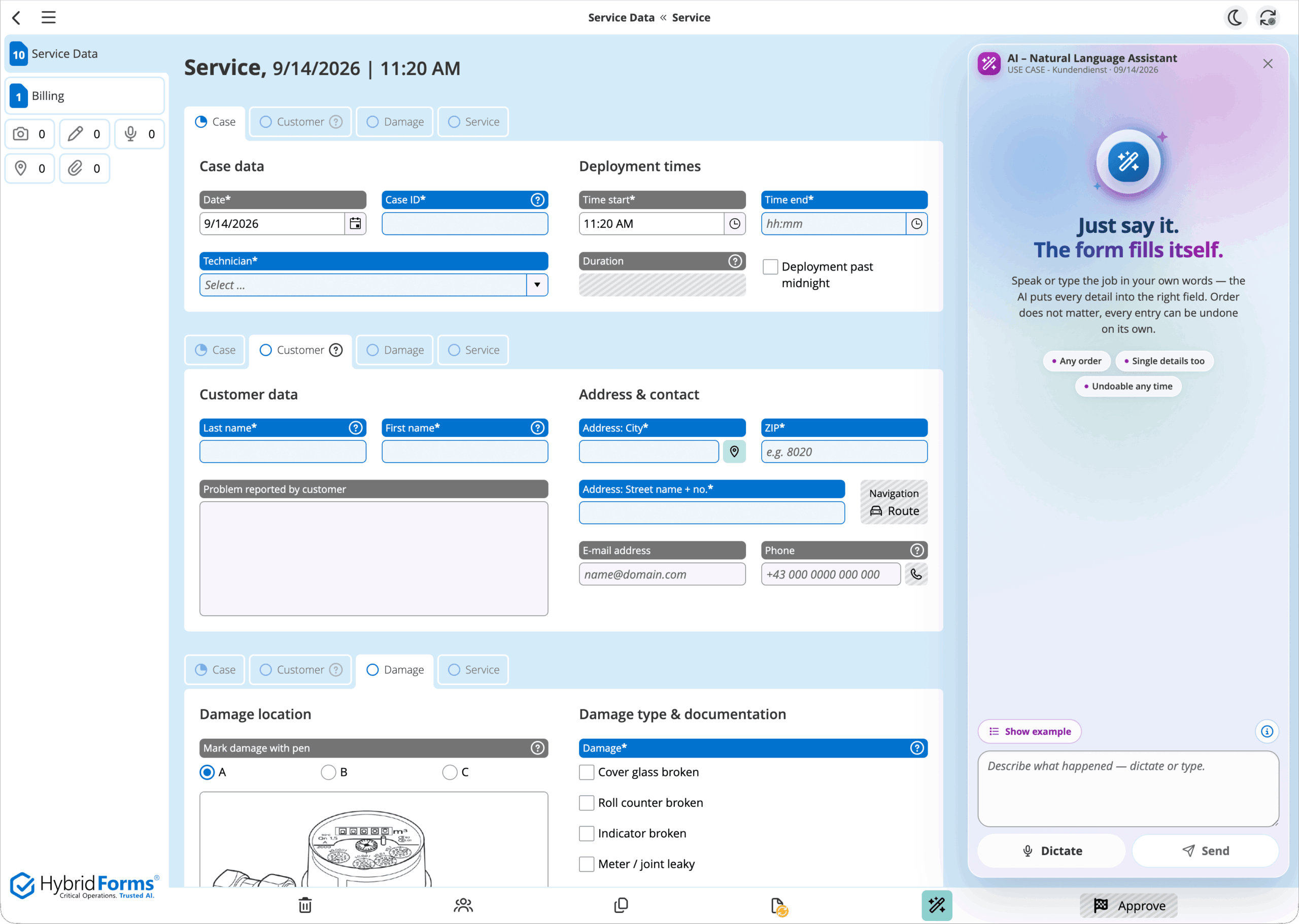
The assistant opens from the »AI Assistant« icon in the app’s bottom toolbar. An example shows what a description can sound like, spoken or typed.
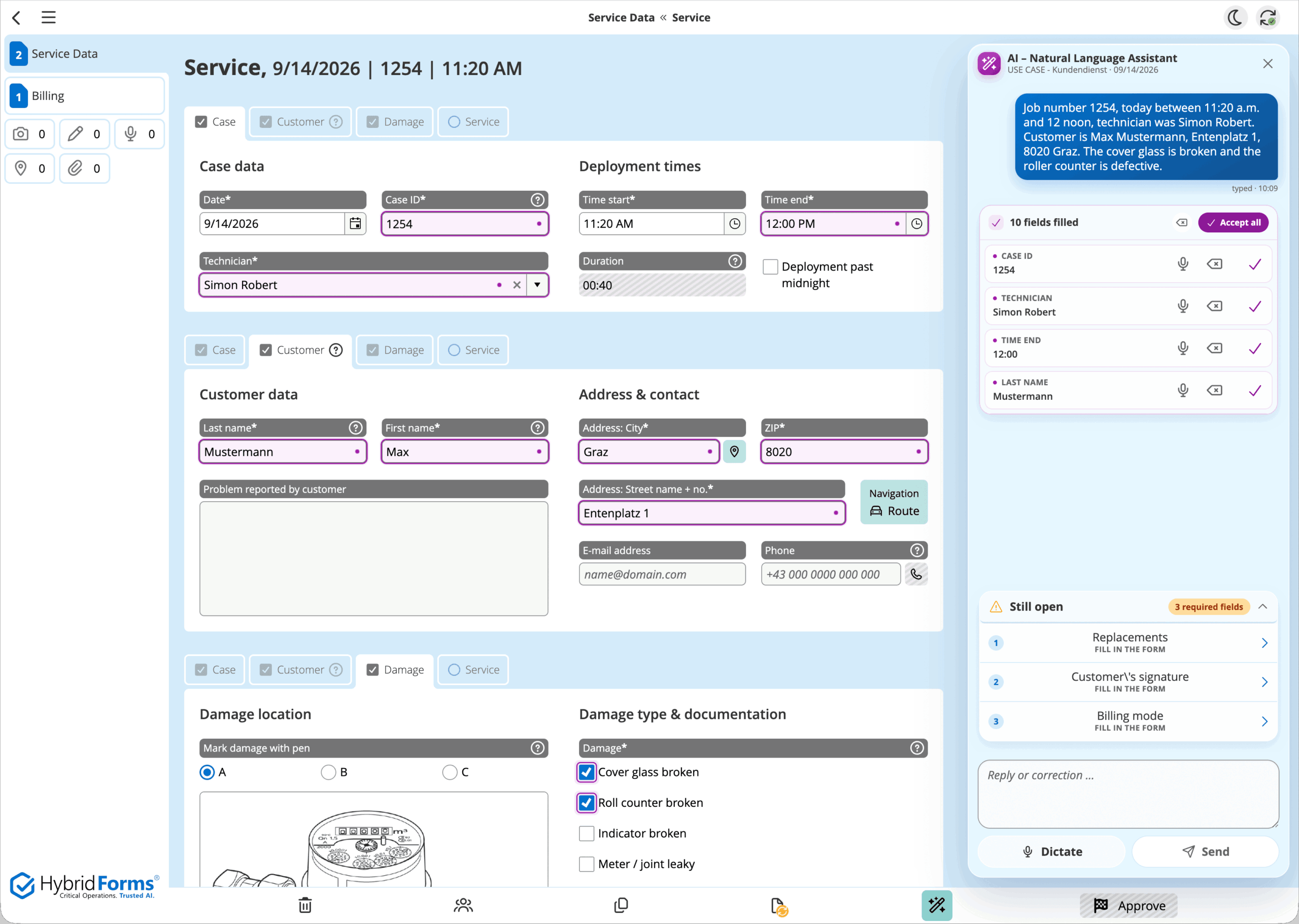
After the input, ten fields are filled. Each entry can be undone individually, and the assistant points out the required fields still open.
Where the Feature Can Be Used
Natural Language Mapping applies wherever data is typed field by field today, from an inspection record in the field to an e-government application in a citizen portal to nursing documentation at the bedside. The scenarios below are examples, not a complete list.
In technical field service, a technician narrates while working: the hours worked, the repairs, and the materials used all come out of what they say, and catalog values such as »cover glass broken« are set at the same time. The maintenance report is done by the time they leave the site. At a police online reporting portal, people who have been affected use the ReachOut module to file a report without registering: they tell what happened, name any suspects, describe where it took place, and then submit the form. And in the clinic, what matters most is that no one has to type more than necessary. Pain, impaired vision, or an injured hand can turn an on-screen keyboard into an obstacle. Preexisting conditions and allergies can now be listed in natural language and captured by the AI assistant – on a tablet in protected kiosk mode for patients.
Natural Language Input for Better Accessibility
For public sector bodies, a second input route is more than convenience. EU Directive 2016/2102 obliges them to make their websites and mobile applications accessible, with separate national implementations in Austria and Germany. Since June 28, 2025, the European Accessibility Act has followed for parts of the private sector, naming self-service terminals explicitly. Voice input alone does not make an application compliant. What it does is put an alternative to the keyboard in place that works just as well, and that is exactly what these rules call for.
Accessibility has a second side to it: assistive support for people with cognitive impairments, or whose first language differs from the language of the form. The AI recognizes the intent behind a description, guides the entry in plain terms, and puts the details into the right fields. More complex procedures, such as filing a police report online, therefore call for less prior knowledge, and the quality of the results improves.
Prerequisites for Using the AI Features
The feature runs only with a Trusted.AI edition of the HybridForms Server: Enterprise or Operator when purchased, Shared.AI or Dedicated in SaaS operation. Anyone using the Business edition today needs an upgrade. Every existing customer can try the Trusted.AI Enterprise edition free of charge for three months, with no obligation to buy afterward. Inside the form, natural language input is enabled, among other ways, through an AI Fill Schema. It extends the existing form definition with what the engine needs in order to map the details. The template stays as it is, including its field order, its logic, and every form item already captured with it.
The feature also needs a connection to the AI server. Offline, it becomes available only after a delay. Filling the form in still works immediately: by keyboard as usual, and for speech through the device’s native dictation function. That writes only into the field where the cursor is, with no distribution across several fields and no follow-up question about required fields.
Secure Operation and Responsibility
Natural Language Mapping is part of HybridForms Trusted.AI. It runs on-premises in the customer’s own data center or as a dedicated managed service inside the European legal framework. No recordings and no form content ever leave that boundary. The feature stays assistive throughout: every entry is logged and individually reversible, and the content becomes binding only once a person confirms it.
The feature also needs a connection to the AI server. Offline, it becomes available only after a delay. Filling the form in still works immediately: by keyboard as usual, and for speech through the device’s native dictation function. That writes only into the field where the cursor is, with no distribution across several fields and no follow-up question about required fields.
Trusted.AI Optionally as a Service From icomedias – in Europe
For a quick start, or where customers would rather not build AI infrastructure of their own, icomedias offers secure operation of HybridForms Trusted.AI on servers in Europe in a range of packages (»token packs«) – with EU GDPR data protection and EU AI Act security.
› More on Trusted.AI: Sovereign AI for Public Authorities, KRITIS & Regulated Organizations