
Release Notes: HybridForms 11 (November 2026)
HybridForms 11 is a major release: the iOS and Android apps run on a new technical foundation. Three additions support data capture in the field: the map becomes a full form control and can be placed anywhere in the form, videos are recorded directly in the form, and there is a new PDF viewer and PDF editor. The HybridForms Server adds the Trusted AI features, and the Admin Web App a new dashboard and a revised design. Security in the development process itself is part of the release as well: from version 11 on, the procedures required by the Cyber Resilience Act are a fixed part of every build.
Highlights in Version 11
- Map Control: the map becomes a full form control – with your own GIS layers, object details on click, and a stored map image when offline
- New PDF editor: annotate, edit, comment, redact, sign, fill in and search, without leaving the app
- Video capture embedded directly in the form: with location reference and automatic length and file size limits
- New technical foundation for iOS and Android: more stable, faster, future-proof, with native device functions and reliable single sign-on
- Cyber Resilience Act: dependency checks, mandatory CI tests, vulnerability and exploit scans, SBOM and update notices – in every release from version 11 on
- Trusted AI on the server: administrators select the AI models and define where AI is used – AI steps can also run inside workflows
- Admin Web App: new dashboard with per-tenant analytics and a revised design
Map Control: Interactive Maps Directly in the Form
With HybridForms 11, the map becomes a full form control. Form designers place it anywhere in the form, exactly like a text or date field. Users see the map where it is needed for the task at hand.
- Add your own geodata: External map services, such as municipal GIS layers, can be placed over the base map as transparent layers.
- Details on click: Objects on the map show the information that belongs to them, for example about pipelines, parcels or measuring points.
- Show and hide layers: Every layer carries a color marker or icon and can be switched individually.
- Several map styles: Users switch between map views depending on the task.
- Compass button: A rotated map is realigned to north with a single click.
- Offline operation: Without a connection, a clear notice shows the offline state; the most recently visited map images remain available in the form and in the PDF.
Use case: Form processes in which maps play an important role – for example inspection, maintenance, situation reporting and incident documentation.
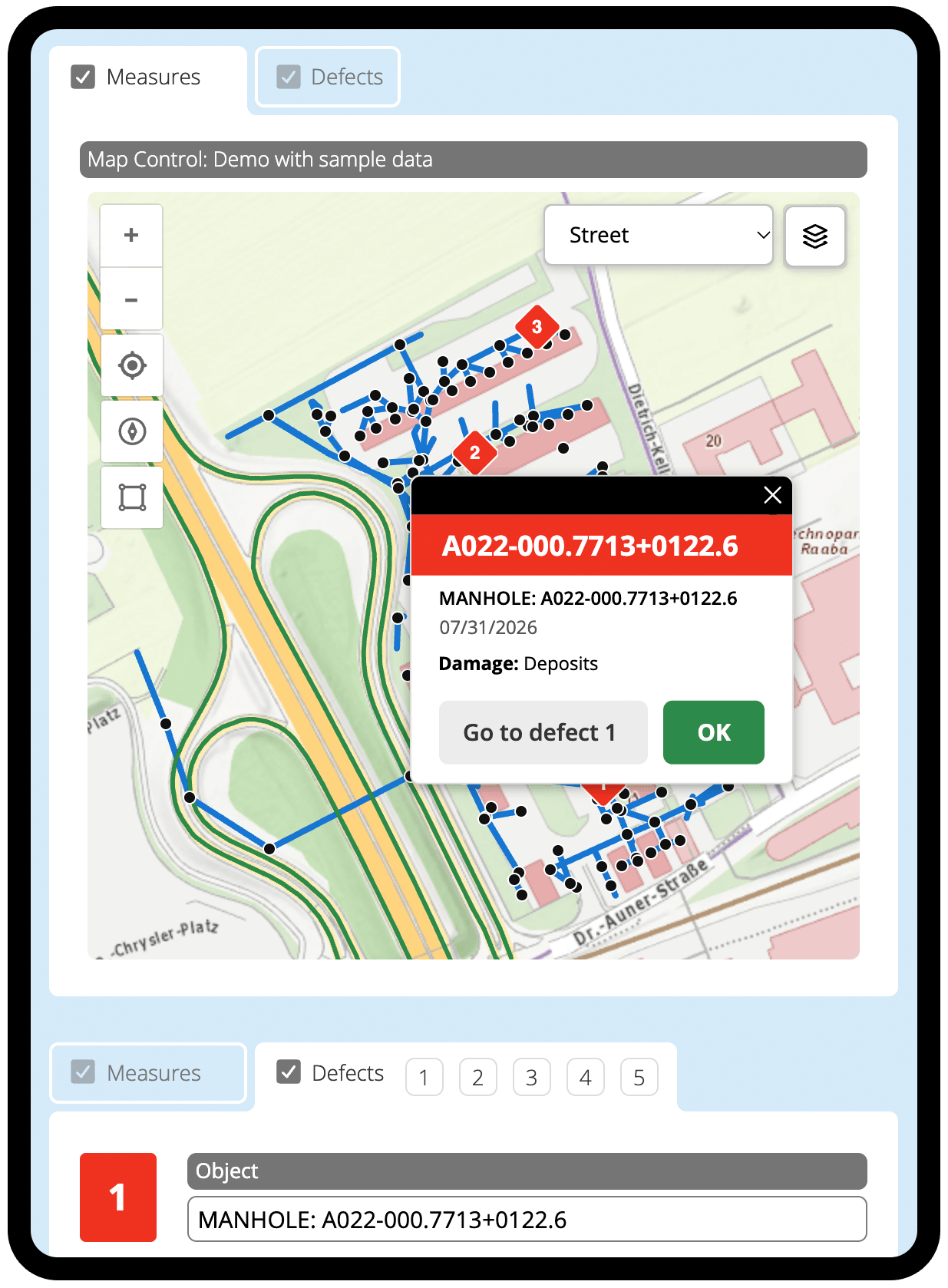
Map Control inside the form: clicking a manhole shows its identifier, date and damage type – and leads straight to the related defect in the same form.
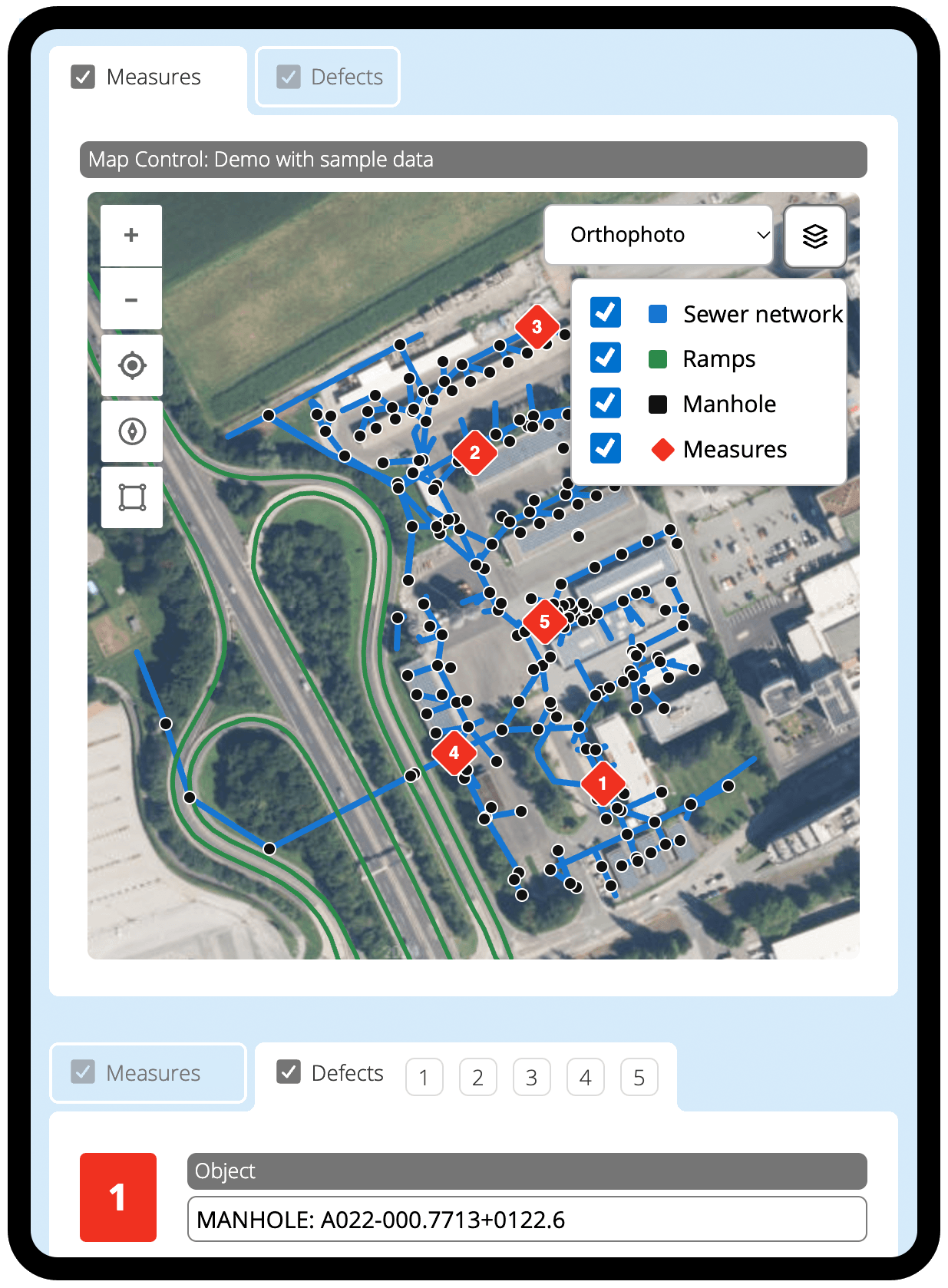
The same map as an orthophoto: sewer network, ramps, manholes and measures can be shown and hidden individually, and the map style is freely selectable.
New PDF Viewer and PDF Editor
HybridForms 11 includes a completely redeveloped PDF viewer and PDF editor: PDF documents are opened, read and edited inside the app. A clearly arranged toolbar presents all functions as unambiguous icons; on the phone, on the tablet and on the desktop it shows the most important tools, with everything else in a menu. The editor automatically adopts the light or dark design and the language of the app.
- Annotate and comment: Highlight passages, draw freely, insert shapes; a dedicated comment bar lists all comments.
- Redact: Confidential details can be redacted in the document.
- Sign: Create your signature once and reuse it in further documents.
- Fill in PDF forms: Fields, check boxes and options directly in the document.
- Search, undo and redo: Find terms anywhere in the document and take back changes at any time.
- Save: The edited PDF is saved with one click and attached to the form.
The PDF viewer and PDF editor are part of the AnnotatePDF server module. The module is not included in the standard scope and is booked in addition, independently of the edition. For version 11, it has been redeveloped from the ground up.
Use case: Cases that involve third-party documents – plans, permits, delivery notes and external forms. Your own data capture still runs through the HybridForms form, with catalogs, mandatory field validation, location reference and signature.
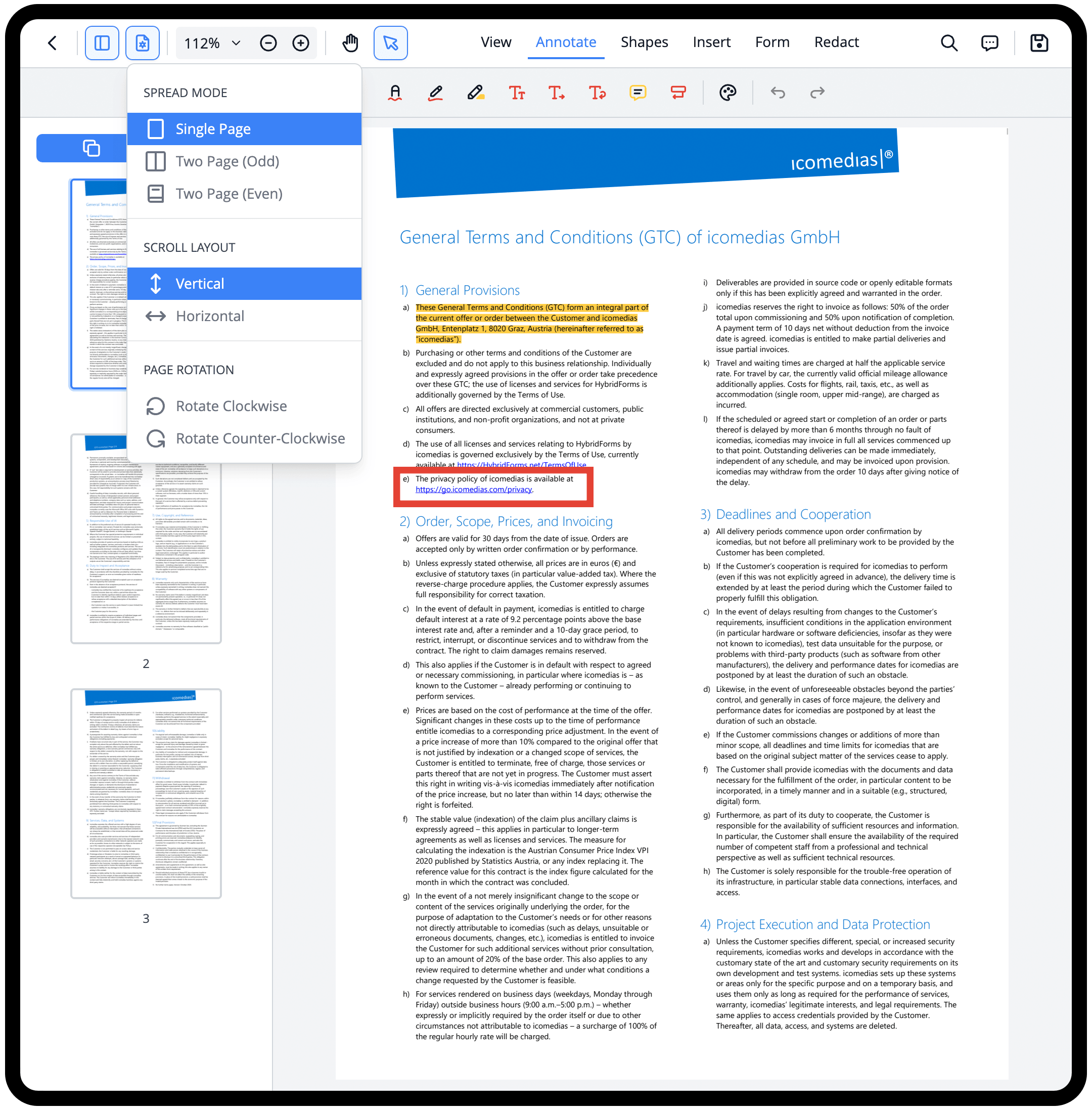
The PDF editor in HybridForms 11: annotations and comments are made in the document, and the view can be set to single or double page.
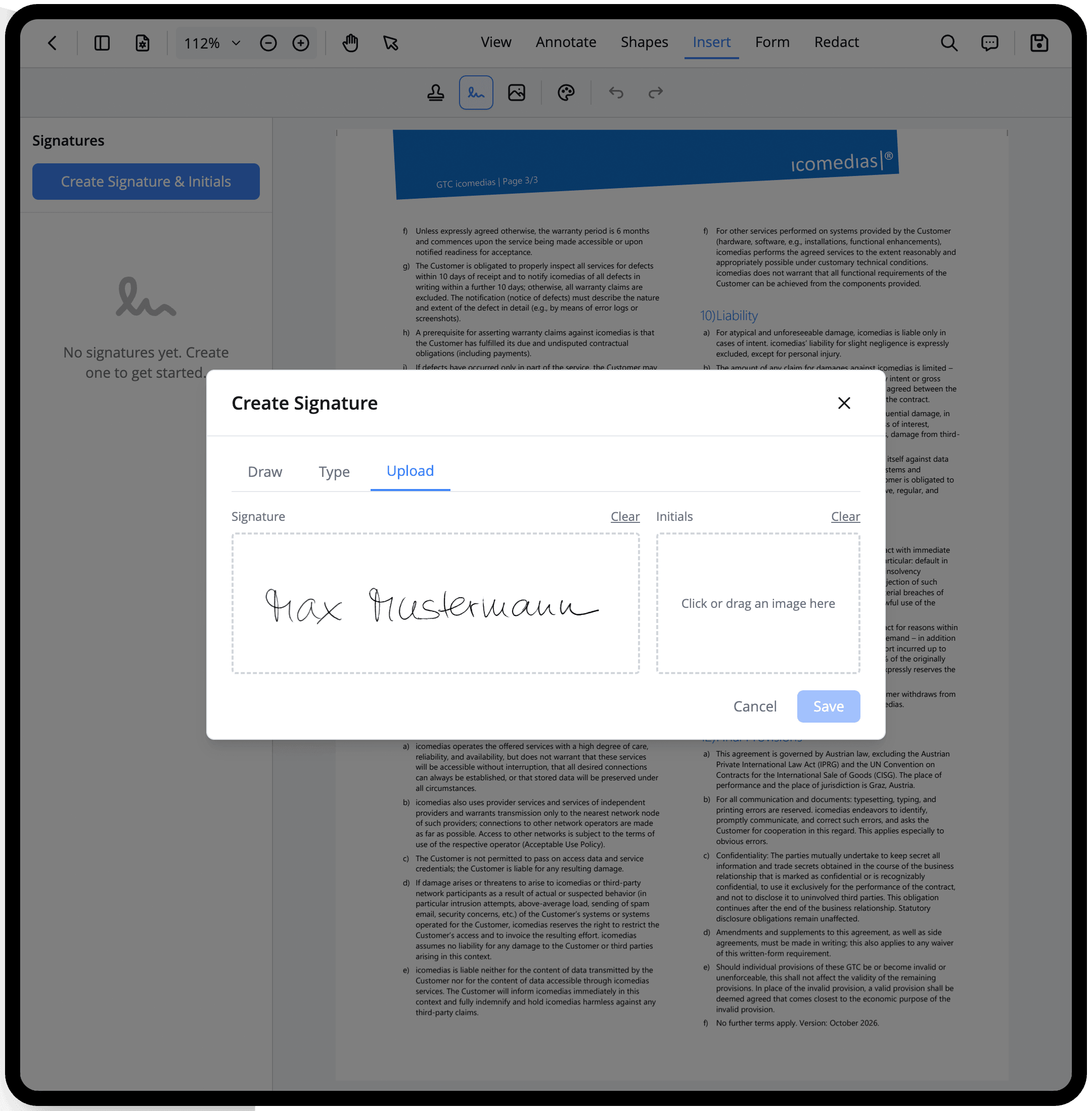
Your signature in HybridForms 11: draw it, type it or upload it as an image – created once, it is ready for further documents.
Video Capture Directly in the Form
HybridForms 11 embeds video capture in the form itself. Recording starts where the evidence is created, without switching to another application, and the finished video is immediately available in the form – on phones and tablets as well as in the browser on the desktop via webcam.
- Full control while recording: The elapsed duration is visible and zooming is possible during the recording.
- Automatic limits: Recording stops by itself once the defined length or file size is reached – which keeps uploads small.
- Location reference: On request, the video stores the recording location including a map section.
- Convenient handling: Renaming, playback and download work the same way as for other attachments.
Use case: Evidence that a photograph cannot capture: progressive damage, functional tests, and sequences that only become apparent over time.
PDF Records in Your Own Corporate Design
As of version 11, the PDFs that HybridForms generates from a form can be output in your own corporate design – controlled through Asset Themes, the central design template of the system. Your organization’s colors, fonts and logo then also appear in the PDF record. Documents that go to customers, public authorities or partners fit into the organization’s visual identity without rework.
Use case: Organizations with binding design guidelines whose form output leaves the house.
New Technical Foundation for the iOS and Android Apps
The HybridForms iOS and Android apps have been moved entirely to a new, modern platform with version 11. The technology used so far is no longer being developed; version 11 stands on a foundation that is actively maintained and keeps pace with every new iOS and Android version. In parallel, the app interface has been modernized and rebuilt from lean, in-house components.
- More stable and faster: The app starts more reliably, lists load and synchronize faster, and the interface responds more smoothly.
- Better device functions: Camera, video capture, document and barcode scanning as well as file access now use current, native interfaces.
- Easier sign-in: Single sign-on works more smoothly, including in corporate networks with an upstream login. »Stay signed in« is reliable, and signing out works even without a connection to the server.
- Future-proof: New operating system versions and security updates can be supported more quickly.
Use case: All users of the iOS and Android apps, and IT managers planning the lifecycle of the app platform in use.
Faster and More Convenient Everyday Work
Four smaller additions in HybridForms 11 affect daily work with lists and attachments.
- Search on the dashboard: The search now finds forms as well.
- Clearer lists: Collapsible grouping has been reworked; you can filter specifically for empty fields, for example all entries without a date or without an amount.
- Paste screenshots: A screenshot can be pasted straight from the clipboard into an image or document field, without saving it as a file first.
- File upload: Uploading files has been reworked across all attachment areas.
Use case: Day-to-day case handling – wherever many cases run in parallel.
Reliability and Security
HybridForms 11 closes vulnerabilities and fixes defects that affected attachments, corporate design and the Excel export.
- Attachments are preserved: Photos and files are carried over automatically after updates; if an attachment is missing on a device, synchronization fetches it by itself.
- Corporate design stays stable: Logo, colors and theme are applied reliably for all users.
- Dependable Excel export: The export works reliably even for large forms with many entries.
- More security: Outdated libraries have been replaced and the desktop app has been updated; the full list of security changes is in the changelog.
Use case: All users, and security officers who need to document the patch level of the components in use.
Trusted AI: AI Under Your Own Control
HybridForms 11 introduces the Trusted AI features. From the outset they remain in the hands of your own administration: administrators select the AI models to be used and define the context in which AI is applied. AI steps can also be built into workflows and executed at defined points of a process.
The division of labor is clearly defined: AI supplies the basis, while signing and approval remain with people.
The AI features require a Trusted AI edition of the HybridForms Server.
Use case: Public authorities, critical infrastructure operators and regulated companies that want to use AI securely and within their own legal jurisdiction, without passing process data to external services.
Security: Cyber Resilience Act Already Implemented
HybridForms 11 meets the requirements of the EU Cyber Resilience Act (CRA). The regulation only becomes binding in full for manufacturers of digital products on 11 December 2027 – in HybridForms development, the procedures it calls for are already in place and are applied to every release from version 11 on.
- Automated dependency checks: The third-party libraries in use are continuously checked against known vulnerabilities.
- Mandatory CI tests: A build that does not pass the automated tests does not ship.
- Vulnerability and exploit scans: Every version is examined for vulnerabilities and known attack paths before it is released.
- SBOM: Each version comes with a software bill of materials – the complete inventory of every component it contains.
- Update notices: HybridForms points out available updates; the notice can be switched off.
Use case: Procurement, IT security and compliance teams in public authorities, critical infrastructure operators and regulated companies that have to evidence the security status of the software they run – and anyone already aligning their supply chain with the CRA.
AI Assistant for Forms (Beta)
HybridForms 11 includes, as a beta, an AI assistant that supports users while they fill in a form. It opens as a chat sidebar next to the form: the user describes the situation in their own words – by voice input or by keyboard – and the assistant maps the details to the matching fields and enters them there in structured form. It flags any mandatory fields that are still open.
The division of labor of the Trusted AI features applies to the assistant as well: it enters data and points out gaps, while review, signing and approval remain with people.
Availability: The AI assistant is an optional feature and currently available as a beta. It requires a Trusted AI edition of the HybridForms Server; you can move up from the Business edition at any time for an additional fee.
Use case: Organizations with a Trusted AI edition that add the AI assistant and want to speed up the capture of extensive forms in the field.
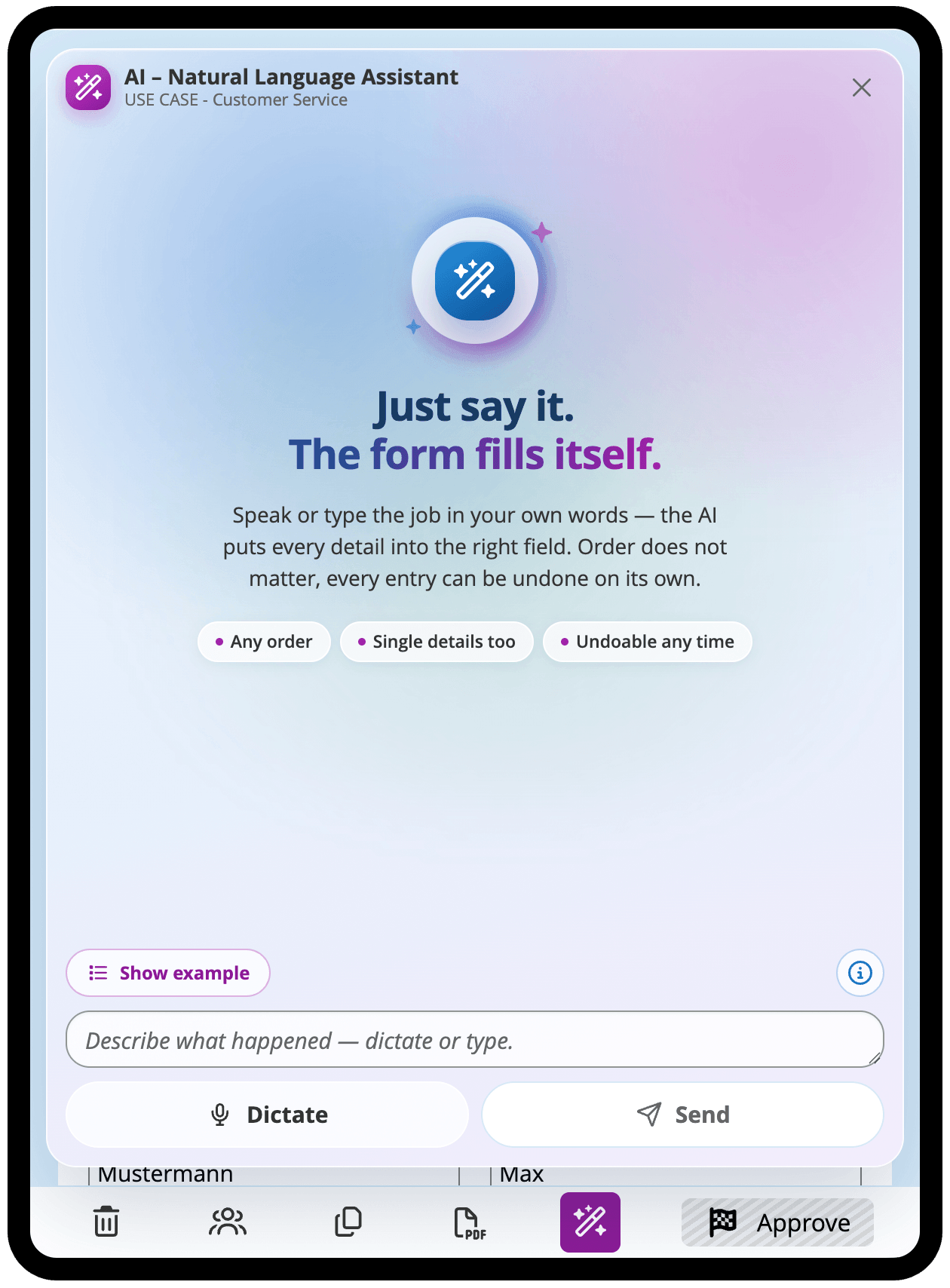
The AI assistant’s start view: users describe the job in their own words, by voice or keyboard – the order does not matter, and every entry can be undone individually.
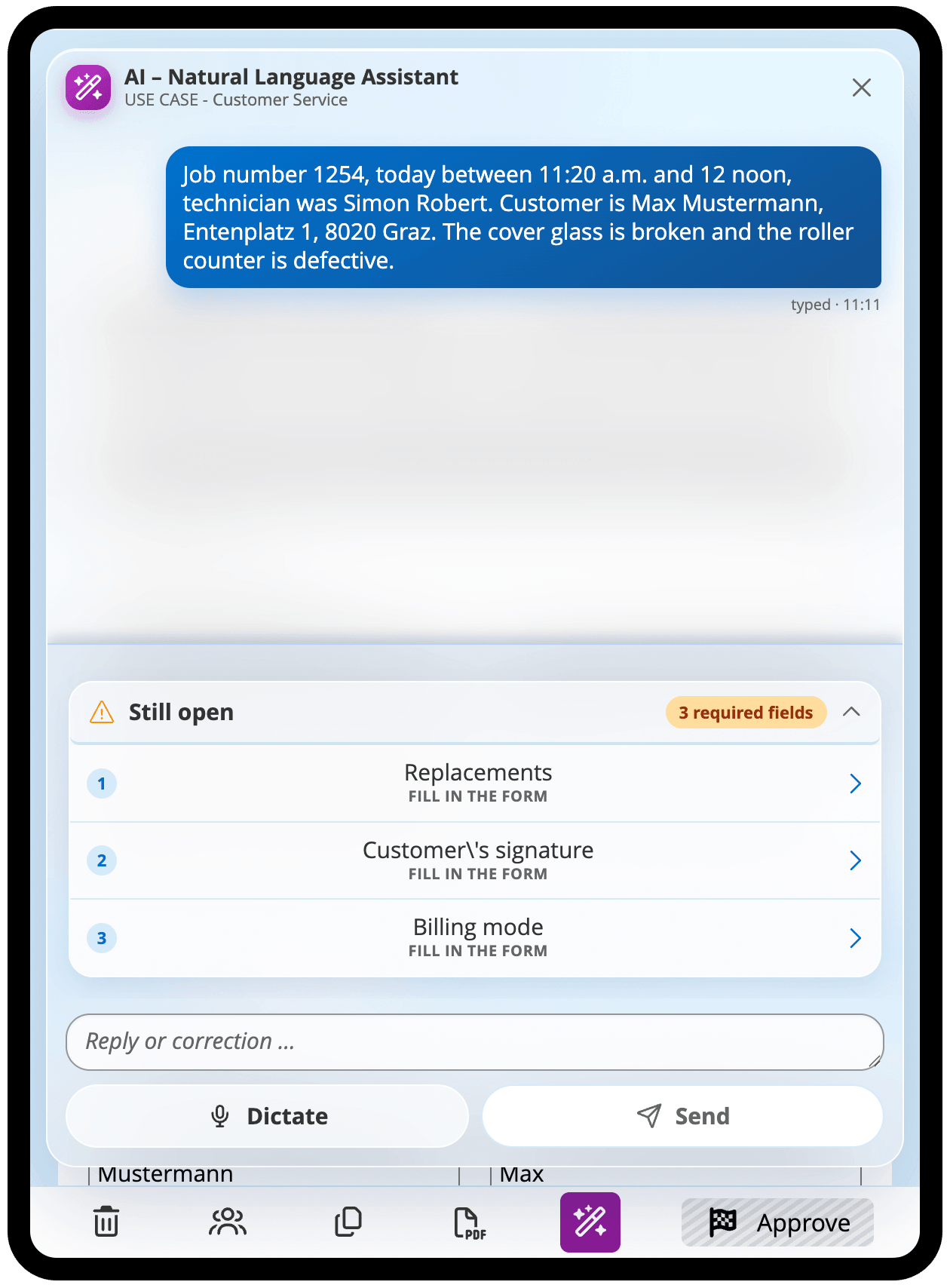
From the free-text description, the assistant transfers the details into the form and flags what is still missing – here three mandatory fields.
Admin Web App: New Dashboard and New Design
The Admin Web App of the HybridForms Server has been redesigned with version 11: a clearer stage editor and more convenient tables make daily work easier. A dashboard with per-tenant charts is new, covering license utilization and AI usage, among others.
Use case: System administrators and tenant managers who need to keep an eye on utilization and usage.
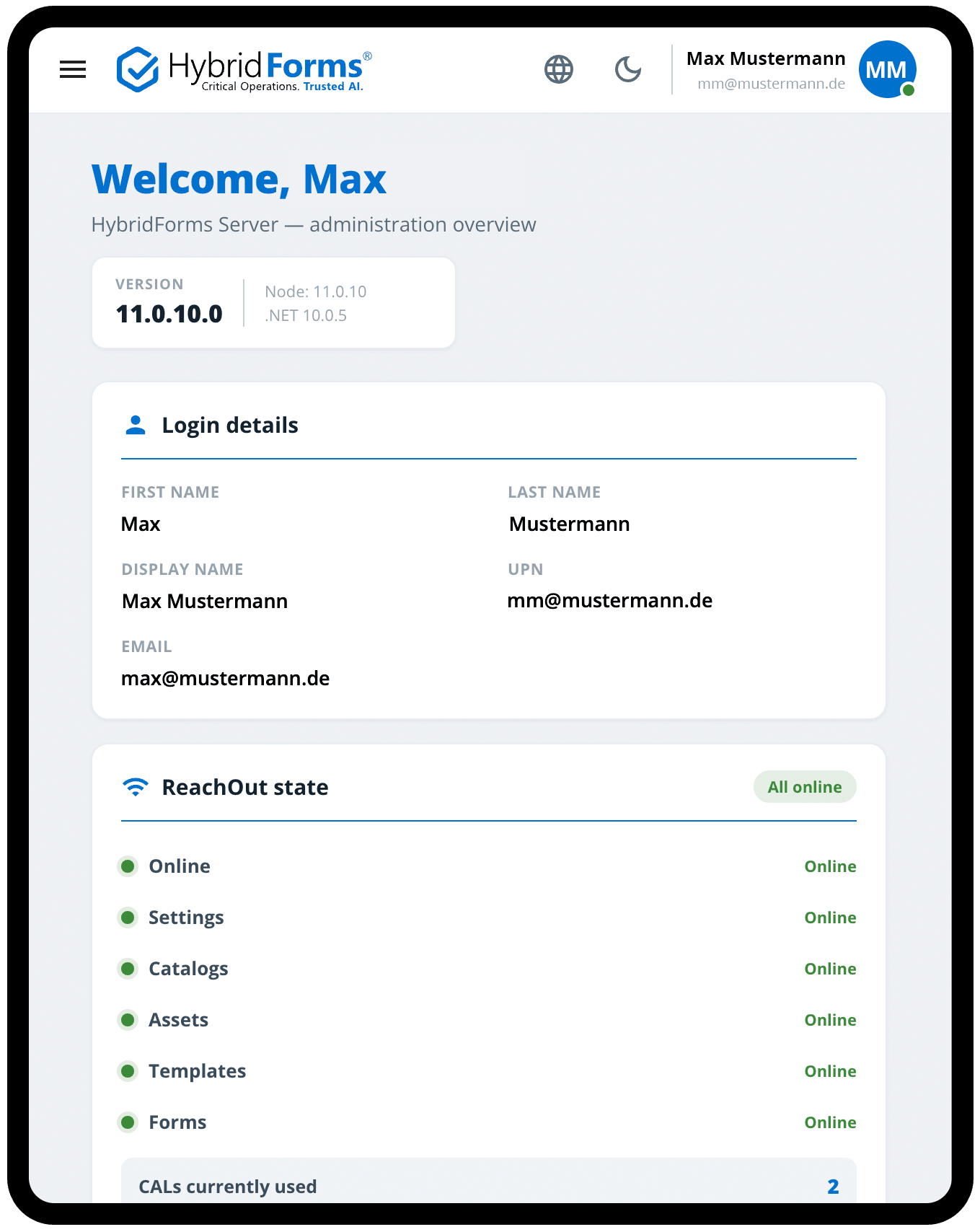
The redesigned administration overview shows the version, sign-in details, the status of the ReachOut services and the number of CALs in use at a glance.
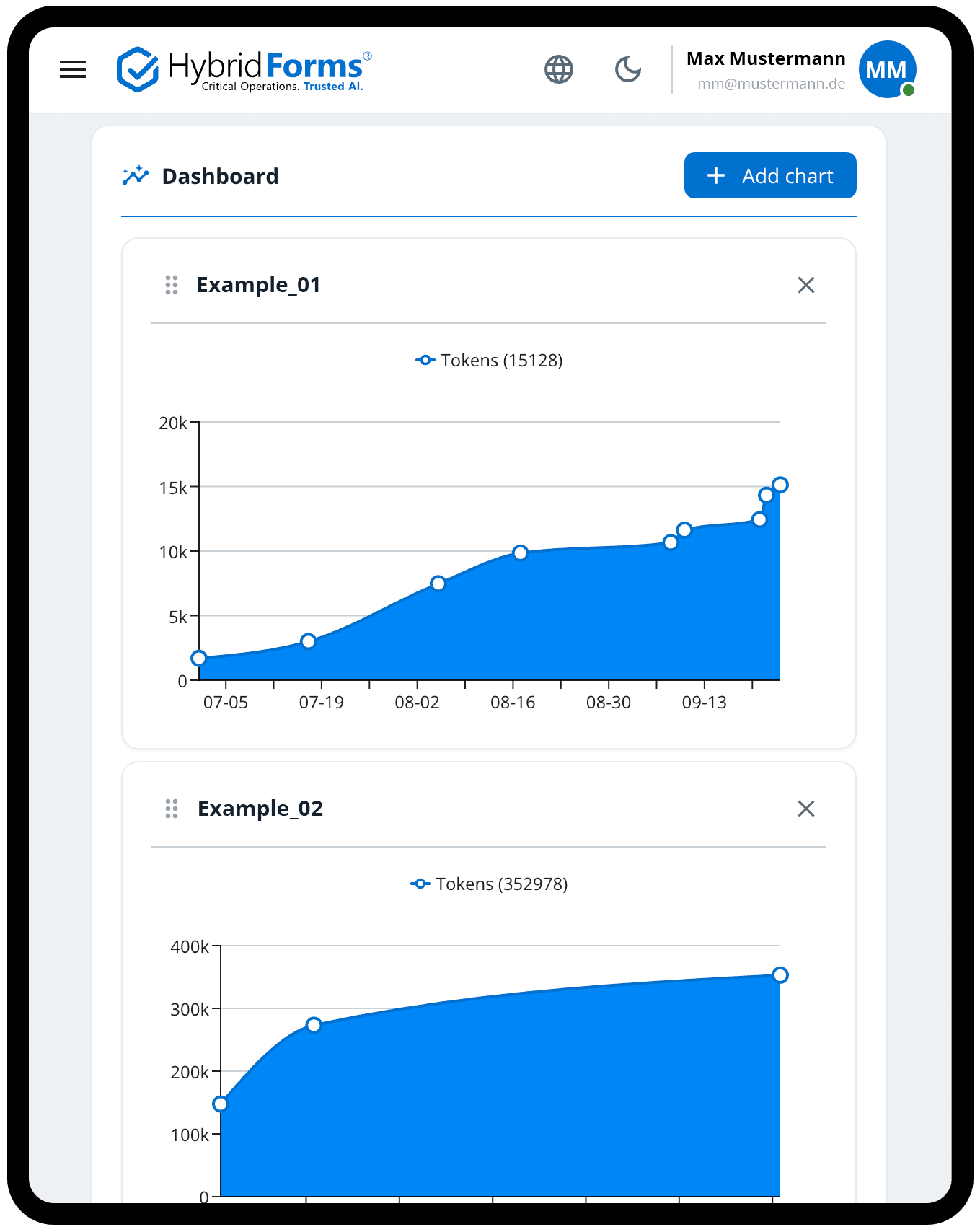
The new dashboard of the Admin Web App: charts can be added, rearranged and removed again – here two views of AI usage.
Traceability and Central Sign-In
With version 11, the HybridForms Server documents the course of a case in more detail and supports a purely central user sign-in.
- More detailed form history: The PDF can now also be retrieved for earlier versions of a form.
- Sign-in option »OIDC Only«: Administrators can move user sign-in entirely to central identity management.
- More security: Licenses are managed per device, workflows are better protected, and input is validated more strictly.
Use case: Audit-proof documentation, and organizations with central identity management.
Note for Administrators: Changed Sign-In Redirect for Single Sign-On
The new iOS and Android apps use a changed redirect address for signing in via single sign-on (SSO redirect). This address has to be entered in the identity provider configuration before rolling out version 11, so that sign-in on the devices works without interruption.
Use case: Administrators who have connected HybridForms to an identity provider.
Changelog Version 11: All Changes at a Glance
Besides the highlights presented here, version 11 contains a range of further improvements, bug fixes and technical adjustments. The full changelog documents every change in detail – from minor interface corrections to specific bug fixes – and is aimed in particular at administrators and developers who need a complete overview.
The changelog is available only to registered HybridForms customers.
Use case: Administrators and technical staff who want to review every change of a new version in detail.
Available Now – on All Platforms
HybridForms 11 is available for all platforms with immediate effect. The updated app is available for mobile devices running Android, iOS and Windows in the respective app stores – in the Google Play Store, the Apple App Store and the Microsoft Store. The Progressive Web App (PWA) is available directly through your HybridForms Server, for web browsers on laptops and desktop PCs.
If you would like to look at the app first, download it from the store and try it right away: three sample forms are included in the app and can be filled in without an account, without a license and without a server of your own. Productive use requires a HybridForms Server and a user account from your organization.
All end users and system administrators.


Deep-Dive: Book Your Session
Would you like to know more about the new functions in version 11 – for example how to integrate your own GIS layers into the Map Control, how to configure Asset Themes for PDF records, or the prerequisites and deployment options of Trusted AI?
Book an individual deep-dive session with our team. In an online meeting you receive detailed insights directly from product management and business development.