System Structure & Architecture
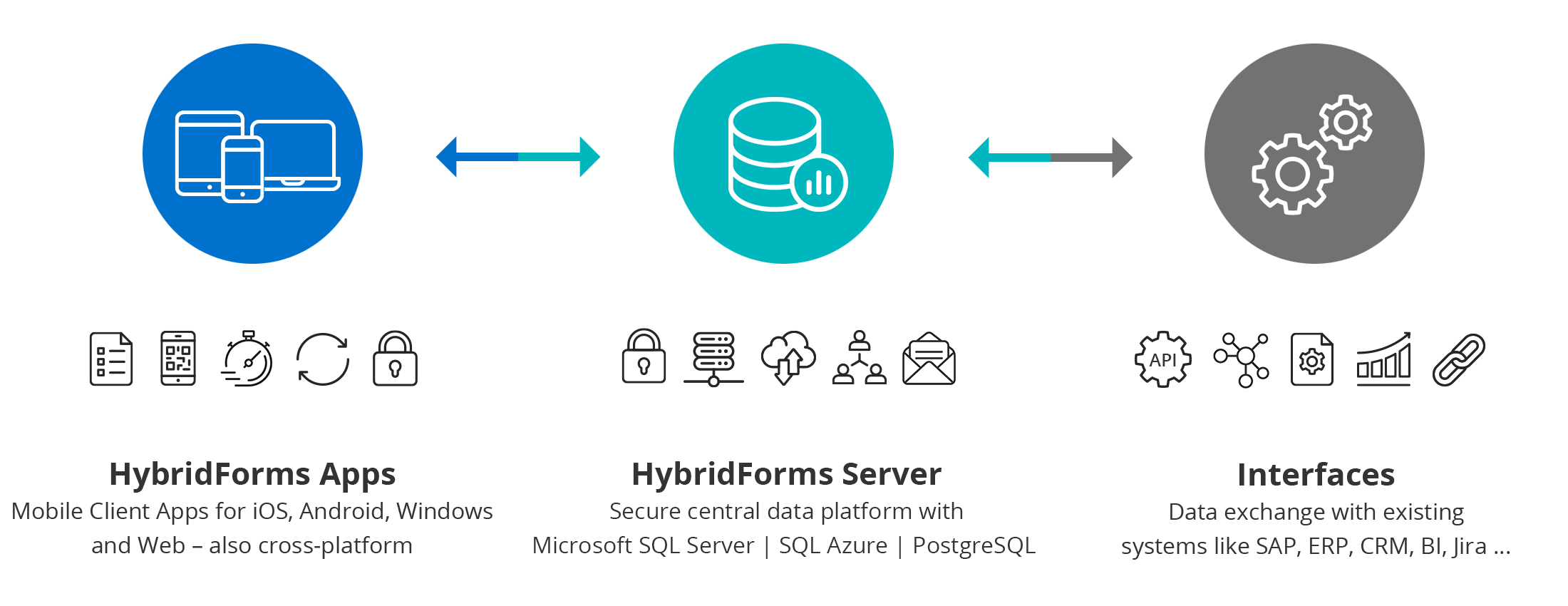
HybridForms is a forms and process platform made up of two components: the HybridForms Server as the backend and the client apps for iOS, Android, Windows and as a Progressive Web App (PWA).
One platform. Every device. Every infrastructure. HybridForms consists of the central HybridForms Server (backend) and the client apps for iOS, Android, Windows, and as a Progressive Web App (PWA) in the browser. The server backend runs on-premises or in the cloud – on Windows Server or Linux, optionally as a Docker container, with Microsoft SQL Server or PostgreSQL.
General System Structure & Concepts
The system consists of two central components: the HybridForms Server as the central backend and the HybridForms Client Apps for iOS, Android, Windows and as a Progressive Web App (PWA) for web browsers.
As a database backend, HybridForms supports both Microsoft SQL Server and PostgreSQL – operated on Windows Server, Linux, as a Docker container, or in the Microsoft Azure Cloud. PostgreSQL offers a cost-efficient, open-source-based alternative for organisations that rely on vendor-independent infrastructure.
A HybridForms Server License is required for operation. Every user of a client app additionally requires a User License (Client Access License / CAL), which is centrally managed and administered on the HybridForms Server.
HybridForms Server: Multi-System Architecture
The HybridForms Server supports a multi-system architecture (client, tenant). The server is available for purchase in three editions: Business, Trusted.AI Enterprise, and Trusted.AI Operator. By default you run one system; with Trusted.AI Operator you run up to five tenants on one server, each with separate administration.
The same architecture applies in the SaaS model. Shared and Shared.AI each get their own tenant in a multi-tenant environment, Dedicated a fully separated server instance.
HybridForms Server
- System 1
- Form Templates
- Form Areas
- Area 1…n | Form Items
- System 2 (Operator Edition only)
- Form Templates
- Form Areas
- Area 1…n | Form Items
- System n (Operator Edition only)
Systems (Clients, Tenants)
Each system can be managed independently and configured flexibly for individual departments or customers. The system concept enables granular, delegable administration by local or department-specific administrators.
Forms: Templates | Areas | Items
Templates
Form definitions (form data fields, layout, etc.) are stored as so-called templates. Each system has its own set of templates. Templates are first created by an administrator of the respective system, then assigned to the responsible developers and form designers. The administrator also creates users and permissions, as well as the assignment to an »area«.
Areas
Each template is assigned to an »area«. Areas are displayed in the mobile clients apps under »Settings« and serve to structure and organize the available templates and form types.
Items
The actual form data is stored as form elements (»items«) instantiated from the template – for example, manually by a user creating a new form in the HybridForms App. The form entry is assigned to the area of its form template.
User Roles & Administration Levels
HybridForms has several administration or access levels for different types of users:
Core Server Admin
Has access to all elements, in particular the central server settings at the top level as well as administrative access to all systems, templates and user licences. Can add systems and assign them to System Administrators. Can assign user licences from the central licence pool to a system and transfer unused licences back.
System Admin (Tenants)
Has full administrative rights within a specific system. Can manage templates, user licences, groups and areas. Can also view and manage catalogues assigned to the respective system.
Group-based roles
The following group-based roles are available with the GroupAdmin module, which delegates user and group management to the departments.
Group Portal Admin: Can view and manage all groups (e.g. create, delete). Has no access to forms.
Group Portal Read-Only User: Can view all groups but make no changes. Also has no access to forms.
Group Admin: Limited to their assigned group. Can manage most group functions, view and edit their own forms, and access all forms within their group.
Group Read-Only Admin: Read-only access to their assigned group. Can view their own forms and all other forms within the same group, but cannot make changes.
Group Status Admin: Can display and update the status of their own forms, and view and update the status of all forms within their group.
Template Designer
Read-only access to their assigned templates. Cannot edit templates. Has no access to forms.
Catalog Manager
Core Catalog Manager: Full access to all catalogs across the entire platform. Can create and manage cataloges.
System Catalog Manager: Access only to cataloges assigned to their respective system. Cannot create new cataloges.
API‑ and template‑based access roles
Full Access (or Read-Only) & API: Access to all forms within a template, both via the admin UI and the API.
Create Forms: Can create new forms in the app and edit their own forms.
Update Forms: Can edit their own forms.
Standard User
The standard users are outside the administration hierarchy listed above, but are included here for the sake of completeness. Can use the HybridForms App, create forms, and access forms assigned to them or their group. Can access the HybridForms Admin Web App exclusively for their own form entries. No access to administrative functions.
Server modules in the architecture
Seven optional add-on modules extend the HybridForms Server. Three of them are separate server components and need to be accounted for in system planning:
The other four modules – EnterpriseGeo, CatalogSync, AnnotatePDF, and GroupAdmin – run inside the Core Server and need no hardware of their own.
HybridForms Server: System Requirements
HybridForms Server
- Operating System:
- Microsoft Windows Server 2019+ (recommended 2022/2025 – Standard)
- or Linux
- Container (optional): can be run as a Docker container
- Runtime dependencies:
- .NET 10.x + Hosting, Node.js 20+LTS, WebDeploy 3.6+
- Hardware (minimum):
- 2+ Core | 8+ GB RAM (test: 4 GB) | 100+ GB HDD
- Hardware (recommended):
- 4 Core | 16 GB
- ReachOut Server:
- Optional module, network-separated
- 4 Core | 8 GB (optional cluster)
Database Service
- Database:
- Microsoft SQL Server 2017+ (recommended 2019/2022 – Standard or SQL Azure)
- or PostgreSQL
- Database deployment: Windows Server or Linux
- Hardware:
- 4 cores | 16+ GB RAM (optional cluster)
- Collation:
- SQL_Latin1_General_CP1_CI_AS
- Storage:
- Base dataset: 5 GB | Working dataset: 50+ GB
Deployment: Microsoft Azure Cloud or On-Premises (virtual servers)
ADFS (optional): Server 2016+ ADFS 4 (OpenID Connect)
Secure AI Servers: Sovereign AI Infrastructure
HybridForms supports running AI models on dedicated, self-controlled servers – on-premises or in a private cloud. Sensitive form data, voice input and AI processing never leave your own infrastructure. Instead of public AI services, certified, locally hosted language models (LLMs) are integrated, fitting seamlessly into the existing HybridForms Core Server architecture. This model meets the requirements of GDPR, NIS2 and sector-specific compliance regulations – making HybridForms a trusted AI platform for public authorities, critical infrastructure operators and regulated enterprises.